

KLSTR.nano firmware problems
A KLSTR.nano runs its own firmware, separate from the fixture it is built into. KLSTR.ctrl reads the version each nano reports, compares it with the latest release in two places (the Health Check tab and the Upgrade Nano Firmware dialog), and updates nanos over RDM. This page helps when those places disagree, or when an update doesn't do what you expect.
v105
reports a version that ends in -v105, for example 20260505-v105. When a badge or a
finding says something else, trust that text.Firmware findings in the Health Check
The Health Check tab lists firmware findings under nano › firmware, one line per KLSTR.nano, after RDM discovery of its port. For how to read the tab, see Run a health check.
| Rule | What it means | What to do |
|---|---|---|
| factory (Factory firmware active) | The nano runs the firmware it left the factory with: its version ends in -2 instead of a release name | Update it. See Update KLSTR.nano firmware. The same nano is also listed under outdated, because factory firmware is never the latest release |
| outdated (Nano firmware not latest version(v105): followed by the version it runs) | The version doesn't end in -v105 | Update it. Once a release newer than v105 is out, this check still compares with v105, so it can disagree with the update dialog. Trust the Nano Version there |
| undetected (No firmware version detected for nano) | The nano didn't report its software version during discovery | Run RDM discovery on its port again. If it stays, see |
A fourth rule, equality, is listed but no check raises it: it always reads ok.
The findings of a port are refreshed each time RDM discovery of that port finishes. After an update, run discovery on the port again to clear them.
The badge stays amber after a correct update
What you see. In the update dialog, or next to Software version on the KLSTR.nano Info card of a fixture, the round badge next to the version is amber, although the version ends in the latest release. Select out-of-date ticks that nano too.
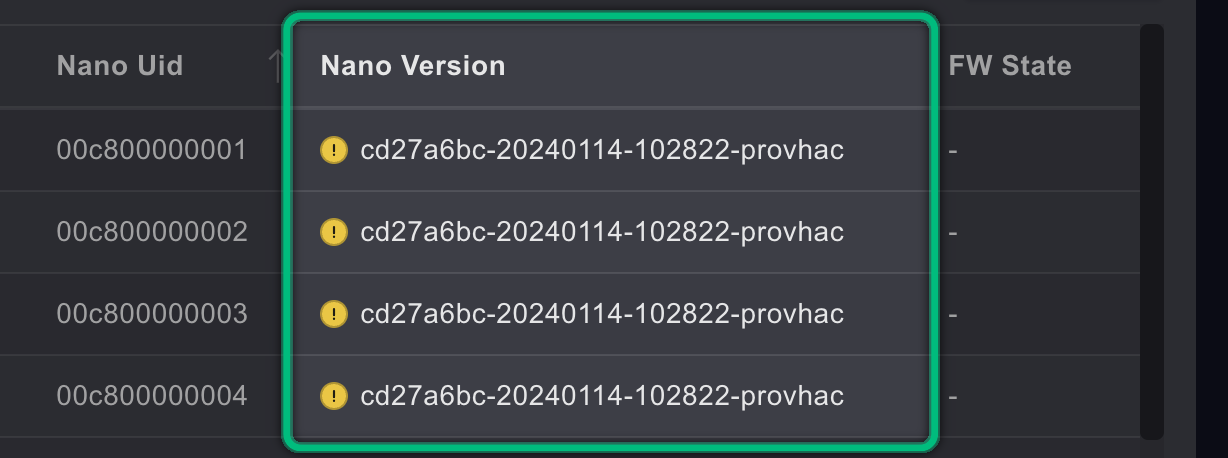
Why. Known display issue: the badge doesn't recognise the date in front of the release name that a nano reports.
What to do. Nothing, the nano is up to date. When you select nanos for an update, untick the ones whose Nano Version already ends in the latest release.
The update ends on done!, but a nano wasn't updated
What you see. The button reads done!, but the Nano Version of one or more nanos doesn't end in the new release.
Why. done! means the run is over, not that every nano took the new firmware:
- A nano that hadn't answered yet when you clicked Start update (its Nano Version or FW State was still empty) is left out of the update, without a warning.
- With Transfer mode set to Unicast, a failed transfer can still end on done!.
What to do. Click done! to reset the dialog. Wait until every row shows a Nano Version and a FW State, tick the nanos that weren't updated, and start again. Always check the Nano Version of each nano after an update.
A KLSTR.one update of its nano ends on done!, but nothing changed
What you see. You updated the nano of a fixture that has a KLSTR.one, from the KLSTR.nano information card of the KLSTR.one. The button reads done!, but the progress bar is still at the start, or the Nano Software version on the card hasn't changed.
Why. The KLSTR.one reports done! also when the flash failed or stopped halfway. The nano didn't take the new firmware and keeps running its previous firmware.
What to do. Click done! and start again. Check the Nano Software version after every update. If it keeps failing, contact KLSTR support. See Update a KLSTR.nano through a KLSTR.one fixture.
The update ends on failed
What you see. The button turns red and reads failed.
Why. If it fails straight after Start update, the firmware file is not a valid KLSTR.nano package or the downloaded copy is damaged. If it fails at the end, at least one nano didn't confirm that it received the whole file, often because of a long or noisy DMX line.
What to do. A nano whose update failed keeps running its previous firmware, so the fixture keeps working. Click failed to reset, and start again with Speed set to Slow or Very Slow (under Show advanced). If it keeps failing on one line, switch Transfer mode to Unicast. For a damaged download, delete the version in User settings › UPDATES and download it again. See Update KLSTR.nano firmware and Manage the firmware cache.
The nano doesn't report a version
| What you see | Likely cause | What to do |
|---|---|---|
| Nano Version reads Unknown, or the Health Check shows undetected | The nano didn't answer the version request, often during a large discovery | Run RDM discovery on its port again. On large rigs, switch on Sequential discovery: see RDM data or sensors are missing |
| A nano disappeared from the topology during or after an update | The nano restarts once its new firmware is in place | Wait. KLSTR.ctrl reads each nano again after the restart. If one stays missing, run RDM discovery on its port |
| No nano answers RDM any more on lines where they are online, after using a manufacturer's tool | The nanos are still in LAN upgrade mode | Choose KLSTR.nano › Nano › Advanced › LAN Upgrade mode cancel, then run RDM discovery again. See Use KLSTR.nano LAN upgrade mode |
| The update dialog lists no nano at all | No nano was found behind the Art-Net nodes, or the nanos are behind a KLSTR.one | Check the Art-Net interface and run RDM discovery. For a nano in a fixture with a KLSTR.one, see Update a KLSTR.nano through a KLSTR.one fixture |
LAN upgrade mode doesn't reach some fixtures
LAN upgrade mode needs KLSTR.nano firmware dated 20250130 or later: the date is the first
part of the Nano Version. Nanos with older firmware ignore the command, so the
manufacturer's tool can't reach the fixtures behind them. Update those nanos first, then
switch LAN upgrade mode on again.
Don't confuse it with LAN transparent mode on the KLSTR.nano information card of a KLSTR.one fixture. That mode works on the one nano in that fixture only, and you undo it by restarting the fixture. See Use KLSTR.nano LAN upgrade mode.
Related
Written for KLSTR.ctrl 1.2.0 (a0df909) · KLSTR.nano firmware 20260505-v105 · Checked 1 Oct 2026